
Litbuy is a China buying agent platform that handles purchasing, warehouse storage, parcel packing, and international shipping in one workflow. Whether you are ordering from Taobao, 1688, Weidian, or a link shared on Discord or Reddit, this guide covers every step from selecting a product to confirming delivery.
The full Litbuy process is organized into three phases: placing an order, waiting for the item to arrive at the warehouse, and submitting a parcel for international delivery. Follow all 11 steps in order for the smoothest experience.
1
How to Place an Order on Litbuy
Steps 1 – 5: From finding a product to completing payment
Select the Items You Want to Buy
Start by finding the product you want. Litbuy supports items from major Chinese domestic platforms including Taobao, 1688, and Weidian. You can search by typing a product name, pasting a product URL, or tapping the camera icon for image search. Products may also come from links shared in Discord, Reddit, or partner creator communities.
Litbuy cannot purchase from cross-border platforms — confirm the source is a supported domestic Chinese seller first.
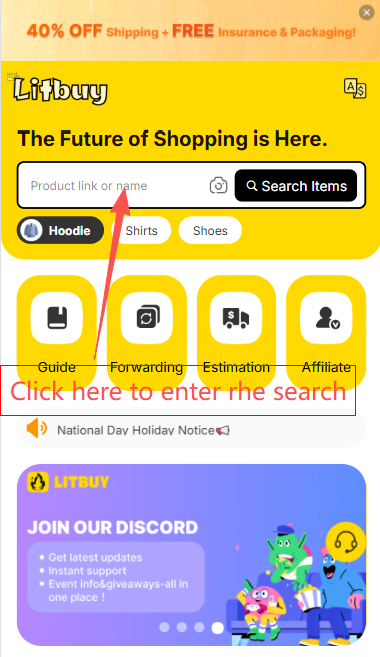
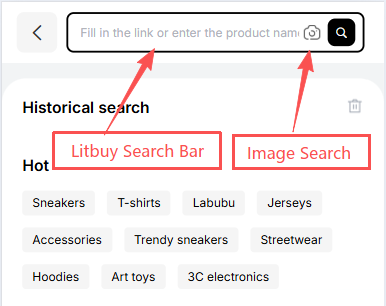
- Find the item on Taobao, 1688, Weidian, or a community link
- Copy the product URL if available
- Or search by name or image directly on Litbuy
- Confirm the source platform is supported
Create Your Order
Paste the product link into the Litbuy search bar. For supported platforms such as Taobao, 1688, and Weidian, Litbuy automatically loads the product details. For platforms that cannot be directly searched — such as Yupoo or Xianyu (Goofish) — click Fill & Buy and manually enter the product information. If the price is unknown, temporarily enter 1 CNY as a placeholder.
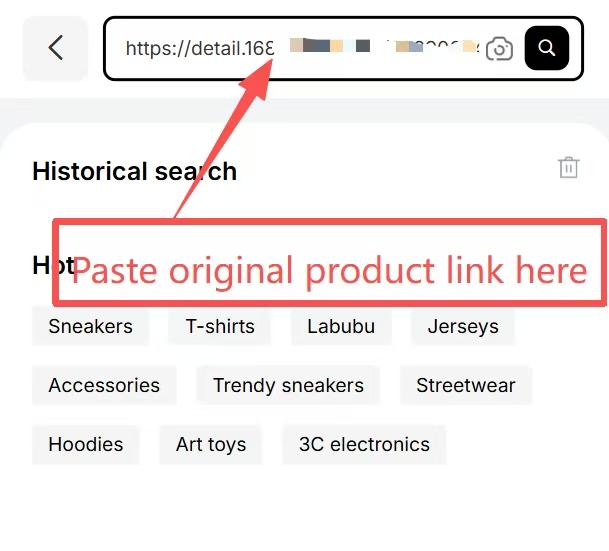
- Paste the product link into the Litbuy search bar
- For unsupported platforms, use Fill & Buy and enter details manually
- Enter 1 CNY if the exact price is unknown
Fill in Product Options
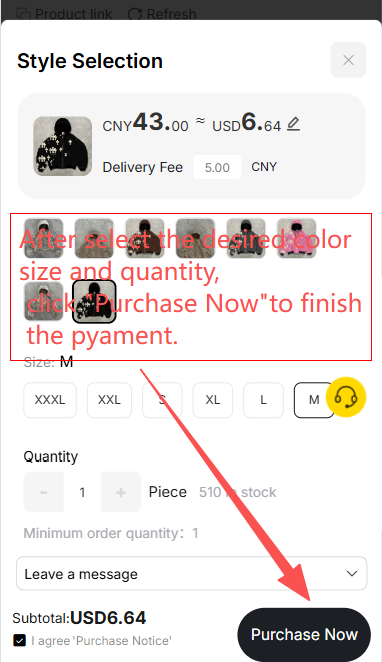
On the product order form, fill in all required fields: color, size, quantity, and any special instructions for the buying agent. Once complete, click Purchase Now to continue.
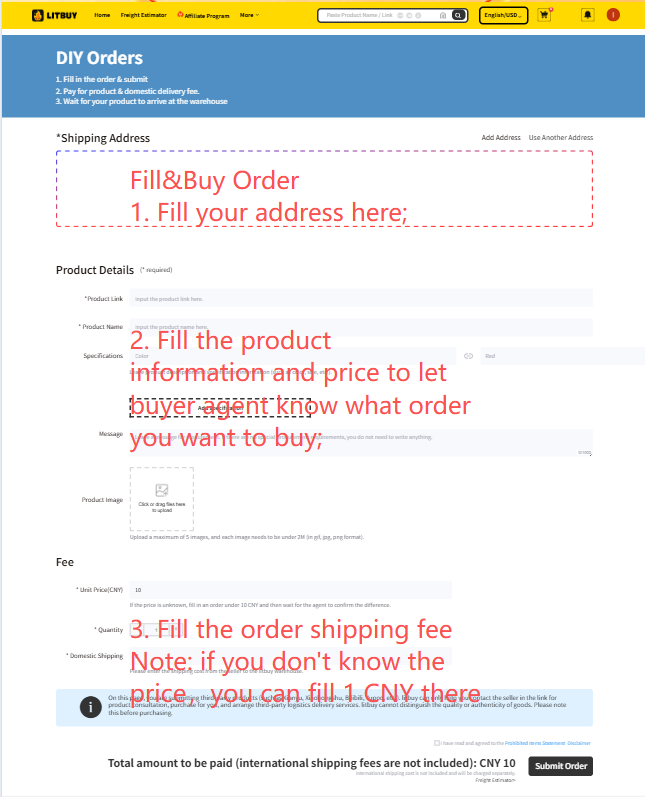
- Select the correct color and size
- Confirm quantity
- Add seller or agent notes if needed
- Click Purchase Now
Important: Incorrect product options may result in the wrong item being purchased. Double-check size and color before proceeding.
Confirm Order Details
Review all order details on the confirmation page — product name, specifications, delivery address, and any requirements. Make sure the shipping address is complete and accurate, as Litbuy uses it to determine available international shipping options. Click Submit Now when everything is correct.
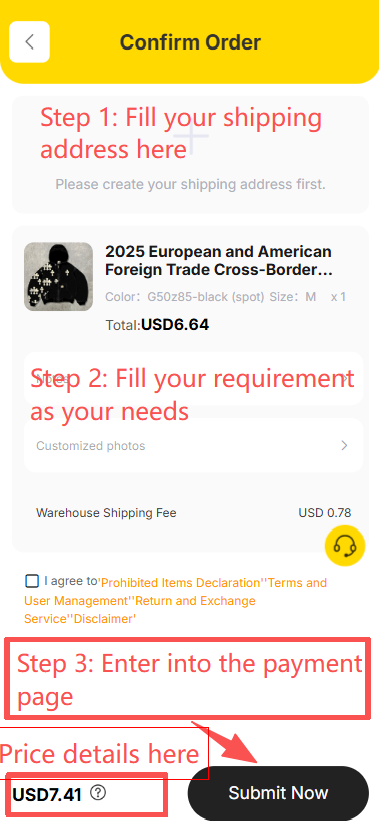
- Verify the delivery address is correct
- Confirm product name, color, size, and quantity
- Contact Litbuy support if your address is unavailable
- Click Submit Now
Complete Payment & Order Processing
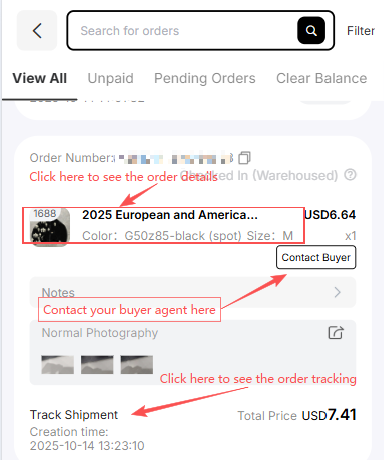
Choose your payment method and complete the payment. After confirmation, the order enters the purchasing pool and Litbuy's buying agent will verify and purchase the item within 6 working hours. Monitor progress on the My Orders page at any time.
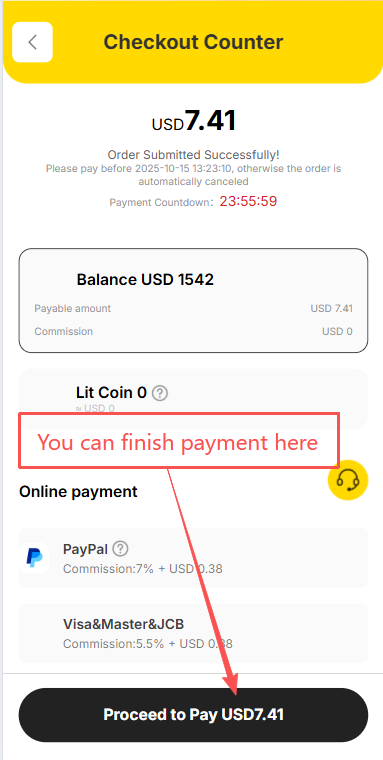
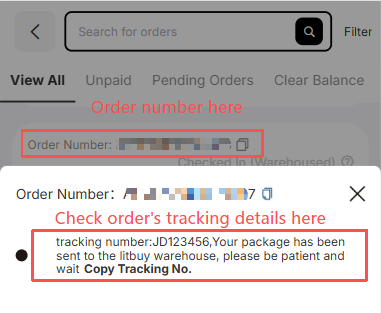
- Choose a payment method and complete the payment
- Open My Orders to check order status
- Wait for Litbuy to place the order within 6 working hours
- Use Contact Buyer if you need to reach the agent
2
From China to Litbuy Warehouse
Steps 6 – 8: Seller ships, order arrives, inspection & storage
Seller Ships the Item
After Litbuy places the order, the seller dispatches the item domestically to the Litbuy warehouse. This is a domestic shipment within China — international shipping has not started yet. Check the order detail page to see the domestic tracking number. Tap Contact Buyer if you need to follow up with your assigned buying agent.
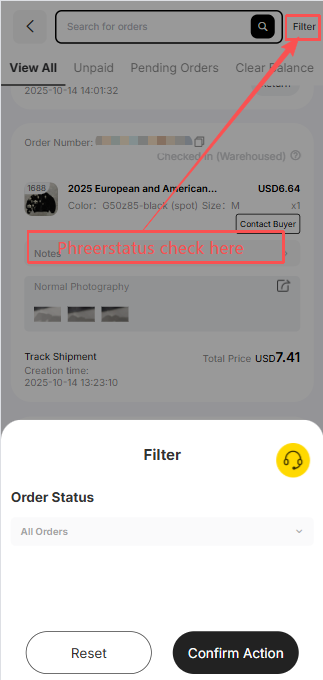
The item is traveling from the seller to Litbuy's China warehouse — it has not been shipped internationally to your address yet.
Order Arrives at Litbuy Warehouse
Once the item arrives, the order status changes to Checked In (Warehoused). It usually takes about 48 hours for the item to be scanned into the system after it reaches the delivery point. Tap the order in My Orders to see the tracking number and warehousing confirmation.
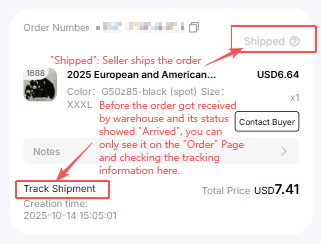
- Status changes to Checked In (Warehoused) after arrival
- Allow up to 48 hours for warehouse scan-in
- Tap the order to see the domestic tracking number
- Use Copy Tracking No. to verify on a Chinese courier website
Warehouse Inspection & Storage
After the item is scanned in, Litbuy warehouse staff complete a quality check within 24 hours. Inspection photos are uploaded to the Warehouse page so you can verify the item's condition remotely. If everything is correct, the item is shelved and ready for parcel submission. Tap Contact Buyer from the Warehouse page if you spot a problem.
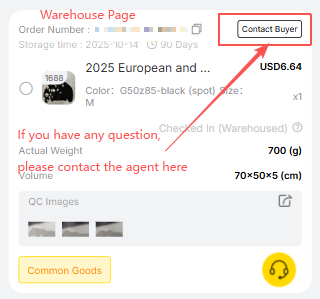
- Open the Warehouse page
- Review the QC inspection photos
- Tap Contact Buyer if there is a quality issue
- Proceed to create a parcel when ready to ship
3
Submit Parcel & Receive Your Order
Steps 9 – 11: Ship internationally, track, and confirm delivery
Submit a Parcel
Go to the Warehouse page and select which stored items to include in a parcel. Litbuy lets you combine multiple orders into one parcel to reduce international shipping costs. After selecting items, fill in your delivery address, choose a packing method (such as carton packaging for better protection), select an international shipping line, and apply available coupons. Click Submit Now to pay the shipping deposit.
The fee shown is an estimate based on expected weight. The final amount is settled after the carrier weighs the actual parcel — any difference is refunded to your balance or charged on the Parcel page.
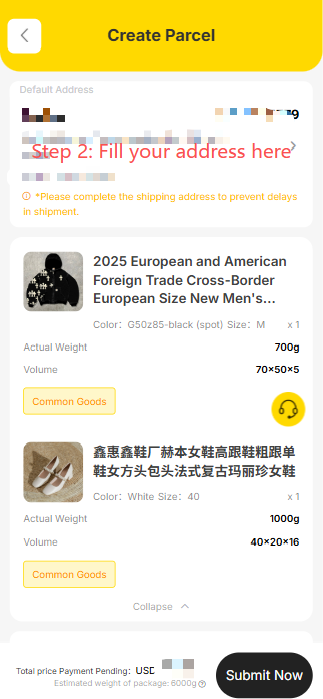
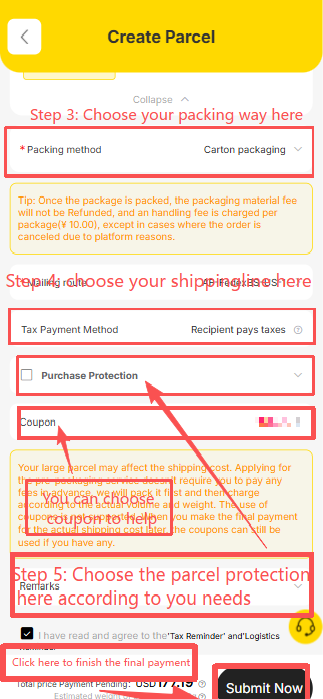
- Open the Warehouse page and select items to ship
- Choose a packing method (carton packaging recommended for fragile items)
- Select an international shipping line
- Apply coupons if available
- Click Submit Now and pay the shipping deposit
Final shipping fee: The carrier determines the final cost based on actual parcel weight. If lower than the deposit, the difference is refunded to your Litbuy balance. If higher, extra fees are charged on the Parcel page.
Track Your Parcel
After the parcel is submitted and packed, it enters the international shipping phase. The Parcel page shows real-time tracking updates from the carrier. Once the carrier processes the parcel, the actual weight and final settled shipping fee are also displayed here.
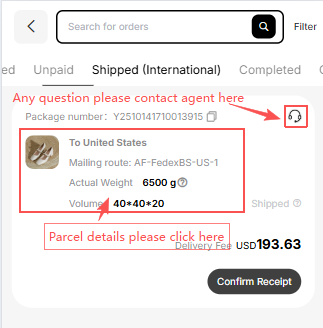
- Open the Parcel page
- Check the latest shipment status
- Note the actual weight and final fee once updated
- Check your Litbuy balance for any refund or extra charge
Confirm Parcel Received
Once your parcel arrives, open the Parcel page and tap Confirm Receipt to close the order. Litbuy notes that clicking Confirm Receipt before the parcel physically arrives will not affect the shipping process — no need to worry if tapped early by mistake.
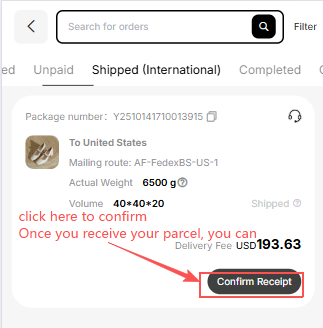
- Wait for the parcel to arrive at your address
- Open the Parcel page on Litbuy
- Tap Confirm Receipt to close the order
- No need to worry if tapped early — it does not affect shipping
Full Litbuy Process Summary
All 11 steps from order to delivery at a glance
The complete Litbuy workflow from start to finish:
- Select the items you want to buy
- Create the order (paste link or Fill & Buy)
- Fill in product options (color, size, quantity)
- Confirm order details and submit
- Complete payment — Litbuy places the order
- Seller ships the item to Litbuy warehouse
- Order arrives and is scanned into the warehouse
- Warehouse inspection and storage
- Submit a parcel for international shipping
- Track the parcel to your destination
- Confirm receipt after delivery
Follow these steps in order for the smoothest Litbuy experience. For deeper detail on any stage, refer to the relevant section above.